One CMDB for your whole POS estate
From the fleet down to a single scanner, Tillforge tracks, deploys, patches, and monitors every store device. Here is what it does.
One source of truth
A CMDB You Can Zoom to Peripheral Level
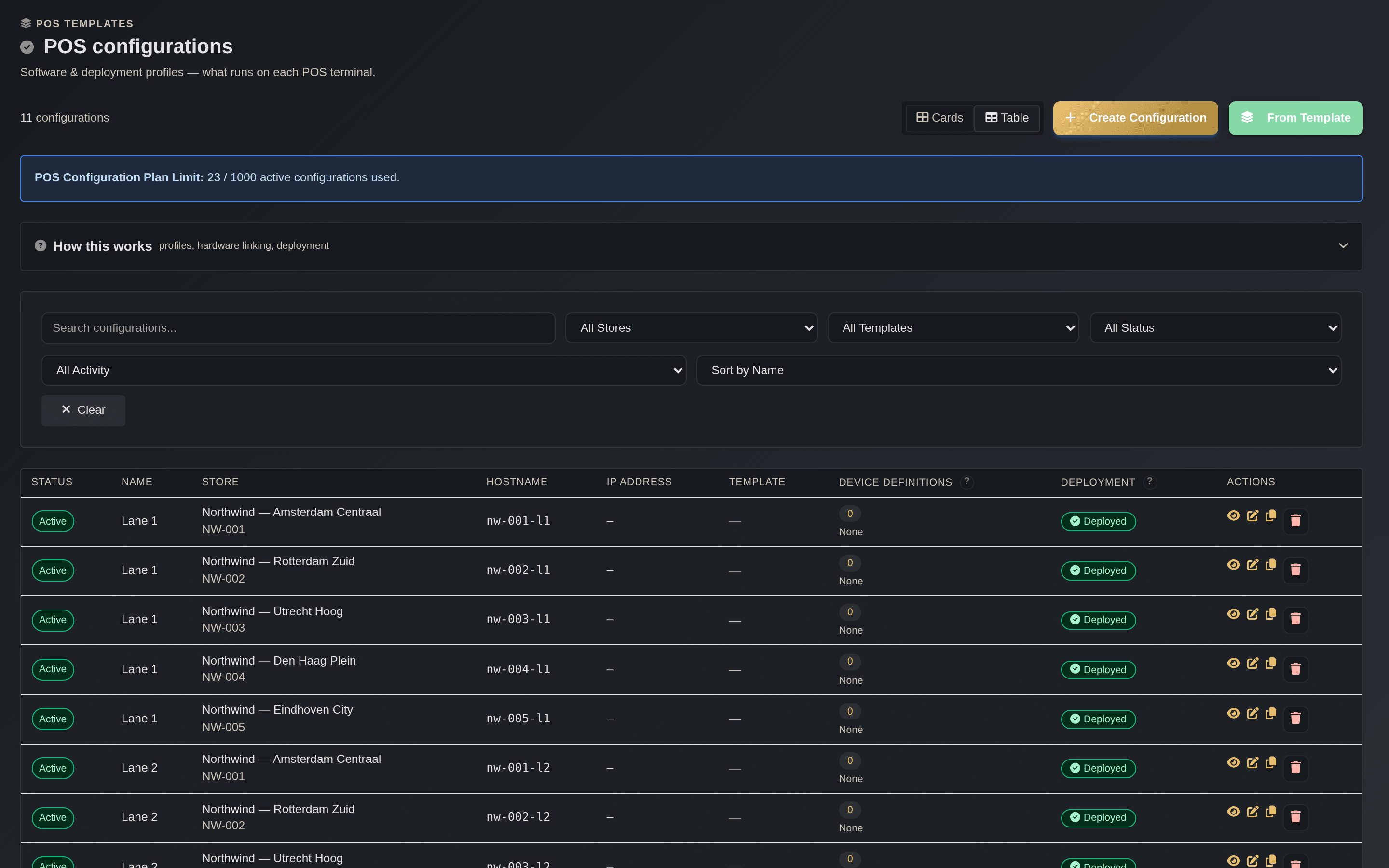
Tillforge is a configuration management database built for retail. Start at the whole estate and zoom in: customer, store, lane, till, and all the way down to the individual peripherals on that till.
- Every scanner, printer, pinpad, cash drawer, display, and scale tracked as its own item
- Serial, firmware, configuration, and connection kept current by the agent
- Hierarchy: Customer, Store, Lane, Device, Peripheral
- Search the estate by serial, hostname, MAC, asset tag, or terminal ID
- Multi-tenant isolation, with card and table views
- The single source of truth the rest of Tillforge is built on
One screen for the whole estate
Command Center & Digital Store Twin
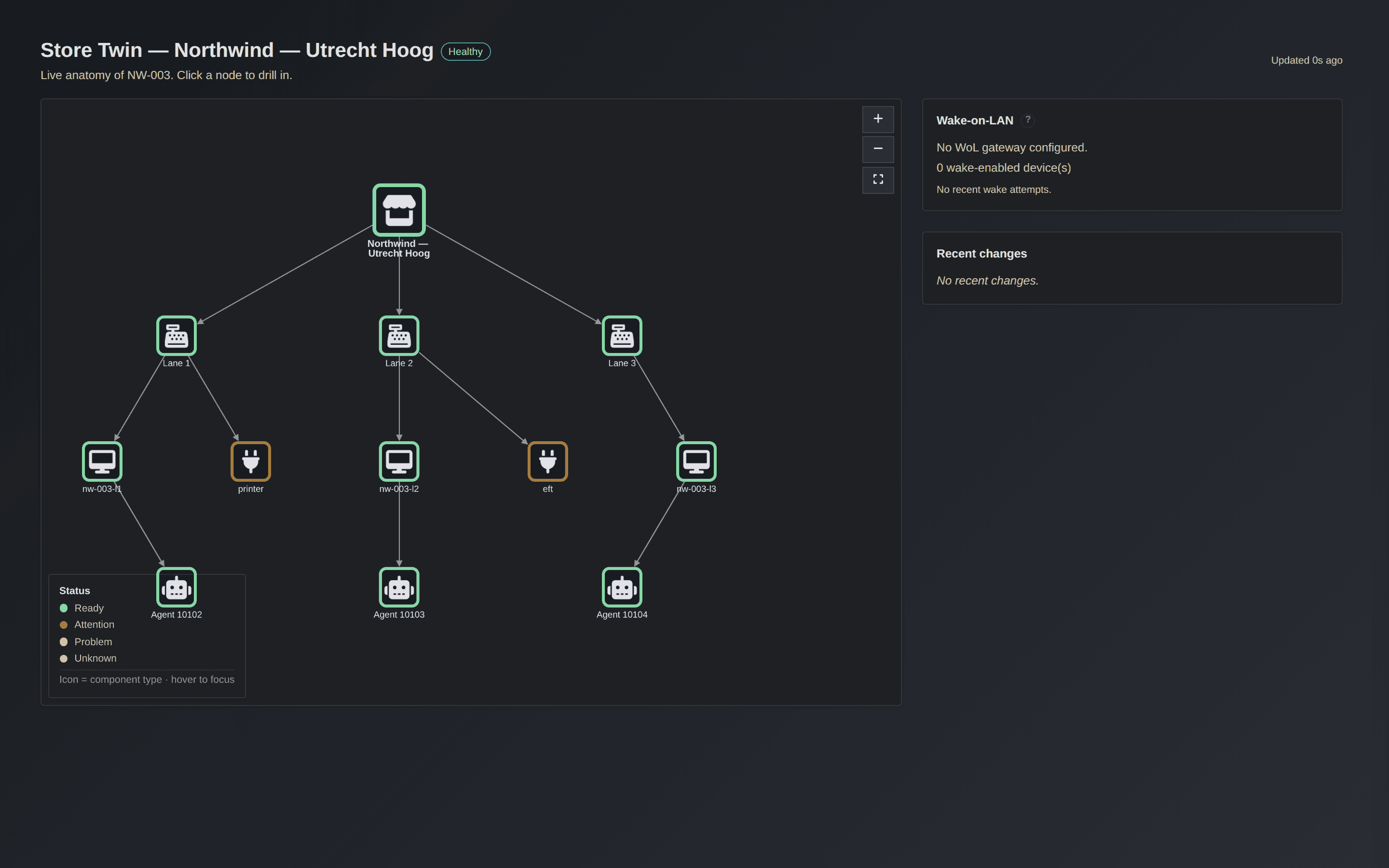
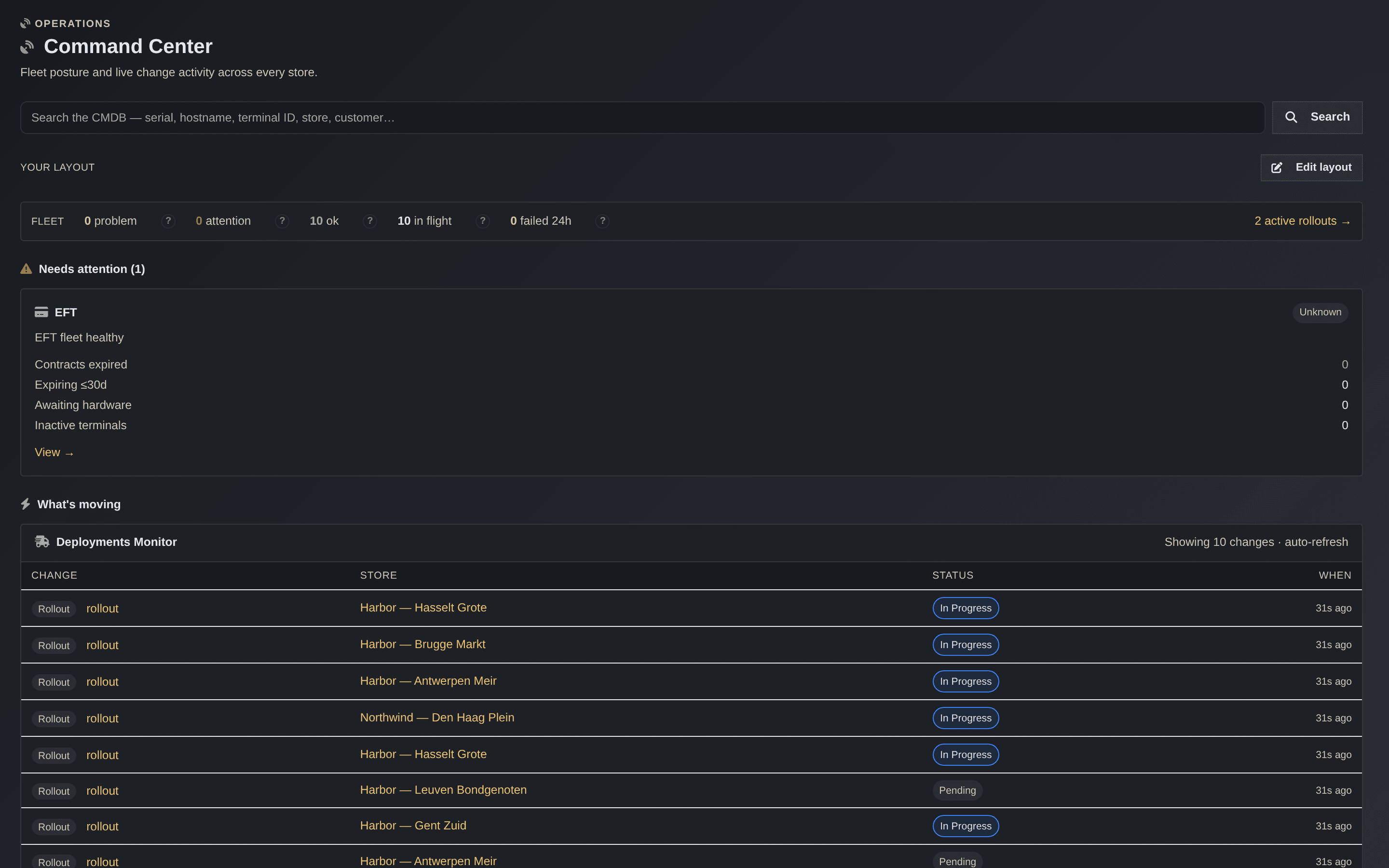
The Command Center opens on what needs attention right now. Open any store as a Digital Twin, a live picture of its lanes, tills, peripherals, terminals, and repos, and fix the broken part in a click.
- Attention-first: which stores are healthy, at risk, or need action today
- Live feed of what is rolling out and what failed in the last day
- Personalizable: drag to arrange the layout to how you work
- Store Twin topology map, each node colored by health
- One-click fixes: wake a device, sync a repo, redeploy a lane, retry a delivery
- Every surface is a view of the same CMDB, not a separate tool
Know a store is safe before you touch it
Store Health & Readiness
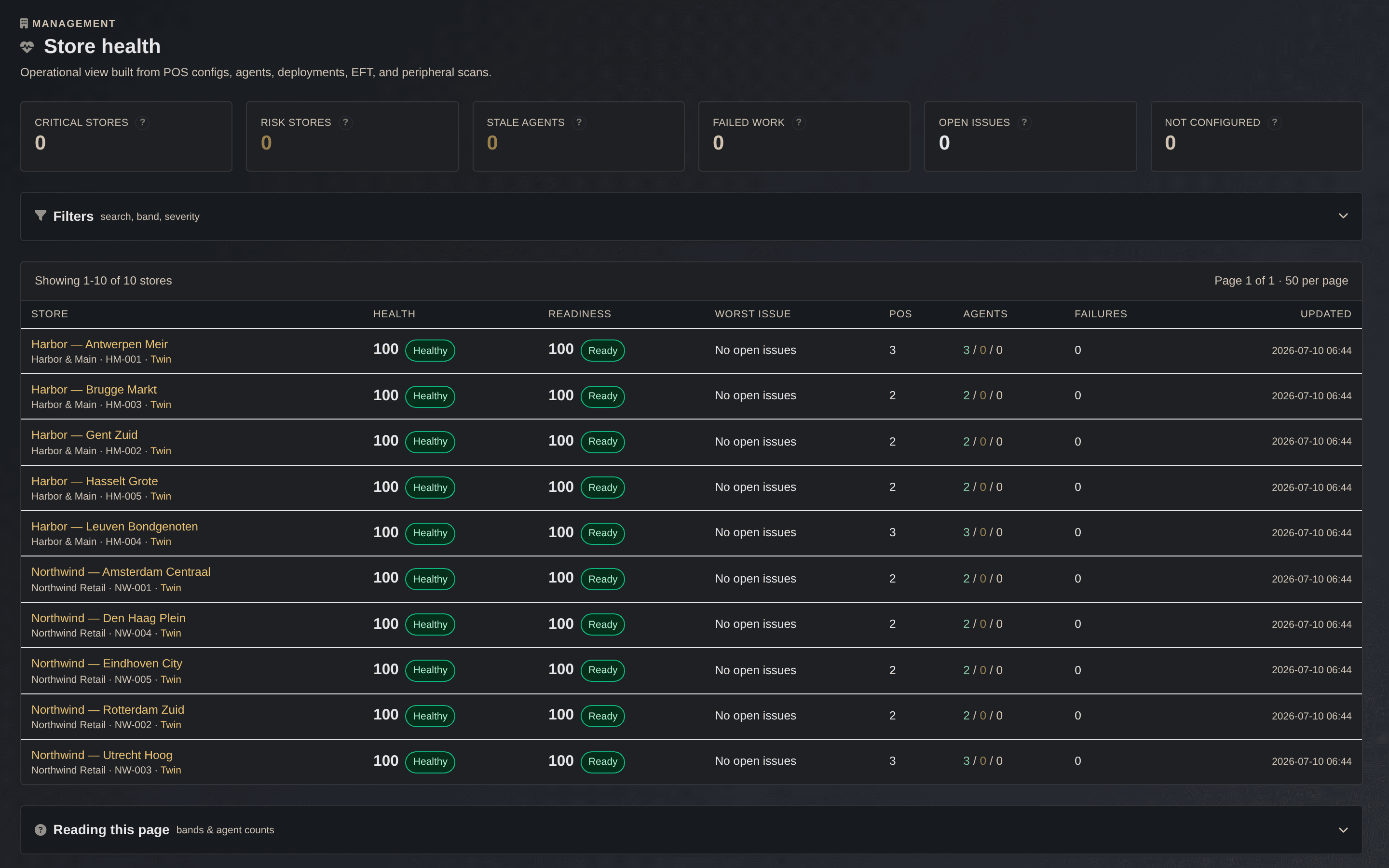
Tillforge scores every store continuously and drafts the issues for you, so problems get triaged instead of discovered when a lane goes down mid-trade. Before a rollout or a store opening, a readiness check gives a plain go or no-go.
- Continuous 0 to 100 health scoring with clear bands
- Auto-drafted issues: offline agent, failed delivery, expiring terminal contract
- Acknowledge, snooze, ignore, or resolve, all audit-logged
- Pre-deploy readiness that names exactly what is blocking
- Readiness gates the rollout engine so a not-ready store is skipped
- Per-store detail with filtering and a manual refresh
Configure a till without sending anyone
Zero-Touch Deployment
Tillforge generates the deployment as signed PowerShell and the device runs it. Once Windows is on the box, the till names itself, joins the network and domain, installs its drivers and software, and comes up configured.
- Template-driven PowerShell for Windows 10 IoT Enterprise LTSC
- Network config: hostname, IP, DNS, and AD domain join
- OPOS drivers, software, and peripheral config applied in order
- Golden-image ready: clones self-register and auto-approve by subnet
- Hostnames and display names generated from your own template
- The server generates scripts, it never reaches into the device
Illustration placeholder
Retail patch management, without WSUS
Windows Patch Management
Retail patch management built for tills, not office desktops. Tillforge pulls Windows and IoT LTSC updates straight from the Microsoft catalog, mirrors them once per tenant, and rolls them out in rings that promote themselves only when the earlier ring stays healthy.
- Microsoft Update Catalog sync with a per-tenant update mirror
- Test, pilot, and production rings with automatic promotion
- Approve a KB once and let it ride to production, or hold it
- Reboots inside the maintenance window, with cashier defer
- Boot-loop protection catches a till that will not come back
- Wake-on-LAN a sleeping register to take its patch
Illustration placeholder
Change hundreds of stores without holding your breath
Rollout Orchestration Engine
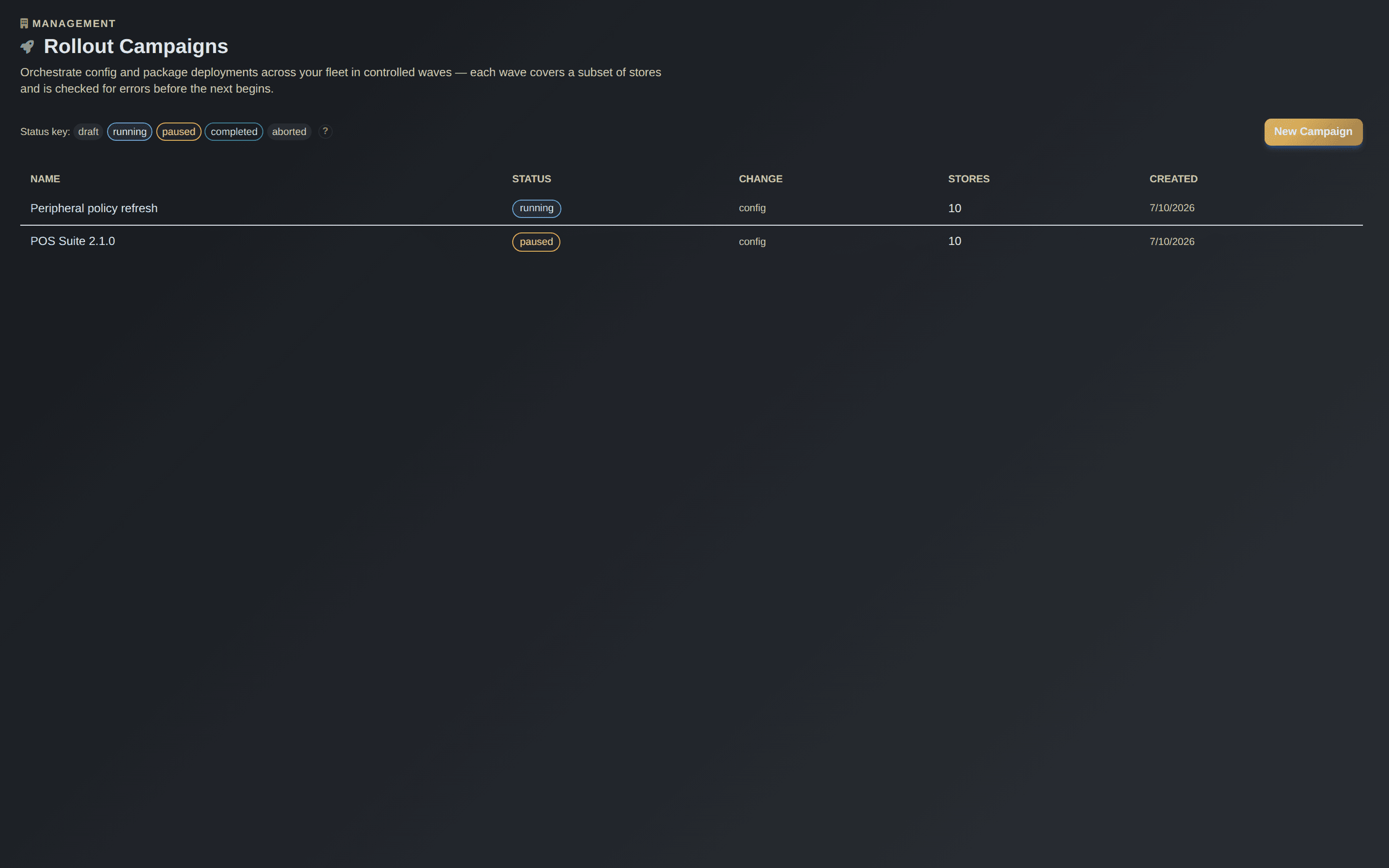
Push a config or a package as a campaign that moves in waves: a pinned pilot store first, then wider waves, with a soak window in between so problems surface before the next wave goes.
- Phased pilot to production waves with a soak window
- Auto-advance once soak passes, or drive it by hand
- A store that is not ready is skipped, not broken
- Auto-pause when failures cross a threshold you set
- Automatic rollback to the previous version
- Advance, pause, resume, retry, and abort stay in your hands
Thin lines and narrow windows, handled
Built for Real Stores, Not Branch Offices
Corporate tools assume bandwidth. Retail does not have it. Tillforge pre-stages files ahead of time, throttles the download so it never chokes a store line, and installs later inside the window you are given.
- Per-agent bandwidth throttle so a thin line is never saturated
- Daily data budget to stay inside a store's connection limits
- Pre-stage now, install later inside the maintenance window
- Coordinator POS: one download per store, shared over the LAN
- Scheduled changes and deployments that wait until it is safe
- Updates land without knocking the checkout over during trade
Illustration placeholder
Software delivery at scale
Package Distribution
Complete package lifecycle from upload to distribution, backed by a repository model so what should be installed is a versioned, reviewable artifact.
Curious how the repo-backed model works without exposing internal implementation details? Read the high-level repo architecture →
- Upload, analyze, version, and distribute packages
- Parsing of EXEs, MSIs, and ZIP archives
- Automatic installation script generation
- Repository-based distribution as the source of truth
- Store-level and device-level targeting
- Priority order: Global, Customer, Field Tech repositories
Illustration placeholder
Change a store without visiting it
Remote Configuration
Update device configuration without WinRM. Devices pull their pending changes from Tillforge and apply them, so a hostname or an IP does not need a site visit.
- Pull-based, no WinRM and no inbound connection to the store
- Immediate or scheduled changes
- Pre-flight validation for conflicts
- Active Directory aware
- Full change history: pending, applying, completed
- The device carries its own credential to poll for work
Bring up a store with no internet
Offline Activation Kit
Build a complete, sealed installation box while you are online, carry it in on an encrypted drive, and activate a POS in a store with zero connectivity. Good for new-store openings before the line is live and stores on unreliable internet.
- A signed, encrypted box built while online
- Activates a store with no internet at all
- Every file re-hashed and verified before it runs
- A tamper-evident receipt updates the store record back at the office
- For openings, maintenance windows, and dead lines
- Merged and proven end to end (not yet running in production stores)
Illustration placeholder
See every scanner before Sunrise 2027
Scanner Firmware & Config, and GS1 Digital Link
Your Datalogic and Zebra scanners each run their own firmware and configuration, and most teams have no single view of what is where. The agent reports each scanner's firmware and flags drift against the version you want, per store and per device.
- Fleet-wide firmware visibility for Datalogic and Zebra
- Vendor tools detected, drift flagged against your target
- GS1 Digital Link (Sunrise 2027) will need 2D-capable scanners
- A readiness target, not a legal mandate, but it hits every store
- Answer the question: which of my scanners are ready?
- Automated firmware and config rollout to scanners is on our build list
Illustration placeholder
Your EFT estate, in the CMDB
Payment Terminal Management
Track and manage your EFT terminals alongside everything else in the store. Contracts, terminal IDs, and store assignment live in one place, and acquirer boarding integrations plug in when the acquirer API is available.
- EFT terminals tracked as first-class items per store and lane
- Payment contract and acquirer details in one place
- Terminal ID and store assignment kept with the device
- Contract expiry surfaces as a store-health issue
- Acquirer boarding integrations plug in when available
- No brand lock-in: manage the terminals you already run
Illustration placeholder
Run it as your own business
Built for MSPs & Partners
Manage every customer as a separate, isolated tenant under your own brand and domain. Bill each one as its own subscription, handle VAT properly, and track hardware across its whole life.
- White-label: your logo, theme, and custom domain
- Per-tenant billing with usage-based overages, invoices, and credit notes
- Dunning that chases late payers for you
- EU VAT handled with live VIES checks and gap-free invoice numbering
- Asset lifecycle: warranty, warehouse, van stock, and store-close reclaim
- Drive it all by API from your existing PSA or RMM
Illustration placeholder
Nothing reaches production unreviewed
Approval Workflows
Enforce change control with approval gates. A change is promoted from development to test to production only after review, and the rule applies to everyone.
- Mandatory approval before a production change
- One approval dashboard across entity types
- The workflow applies to all users, admins included
- Promotion path: Dev, Test, Production
- A complete audit trail for compliance
- Ties into the rollout engine's readiness gates
Illustration placeholder
Trust where it counts
Secure by Design
The agent authenticates every request and talks over HTTPS, and deployment packages can be signed and verified file by file, so a till only runs the bytes you approved. Access and history are controlled and logged.
- Every agent authenticates; traffic goes over HTTPS
- Deployment packages can be signed and verified file by file
- Role-based access control
- Two-factor authentication (TOTP) with backup codes
- Scoped, revocable API keys and configurable session timeouts
- Full audit logging with sensitive fields redacted
Illustration placeholder
Where Tillforge Starts
You own the image. Tillforge owns everything on top of it.
Tillforge does not build or ship your Windows image. The base operating system gets onto a till the way it already does in your world: from the device's own recovery partition, from a prepared USB image kept in the vault for a technician or store manager to run, or from local PXE network boot in the store. Pick whatever fits your hardware and your stores.
From the moment Windows is up, Tillforge takes over. The agent registers the machine, names it, sets its network and domain, installs the OPOS drivers, software, and peripherals, applies the configuration, and brings the till live, all from signed templates, then keeps it patched, configured, and monitored for the rest of its life.
And a Few More
Smaller pieces that round out the platform
Peripheral Artifact Profiles
Template a PeripheralConfiguration.xml and deploy it to the POS during setup
Webhook Management
Event-driven notifications to your own external services
Integrations, coming soon
Open API available now; prebuilt ServiceNow, ITSM, and ERP integrations are on the way
Want to see it on your estate?
Tell us how your stores are set up and we will walk you through where Tillforge fits.